Your most-used tab. Now your most useful.

Turn every new tab into your personal productivity workspace. Notes, tasks, calendar, weather, RSS feeds and 60+ widgets – all in one place.

Free to use · 60+ widgets · Pro features available

4.6 average rating

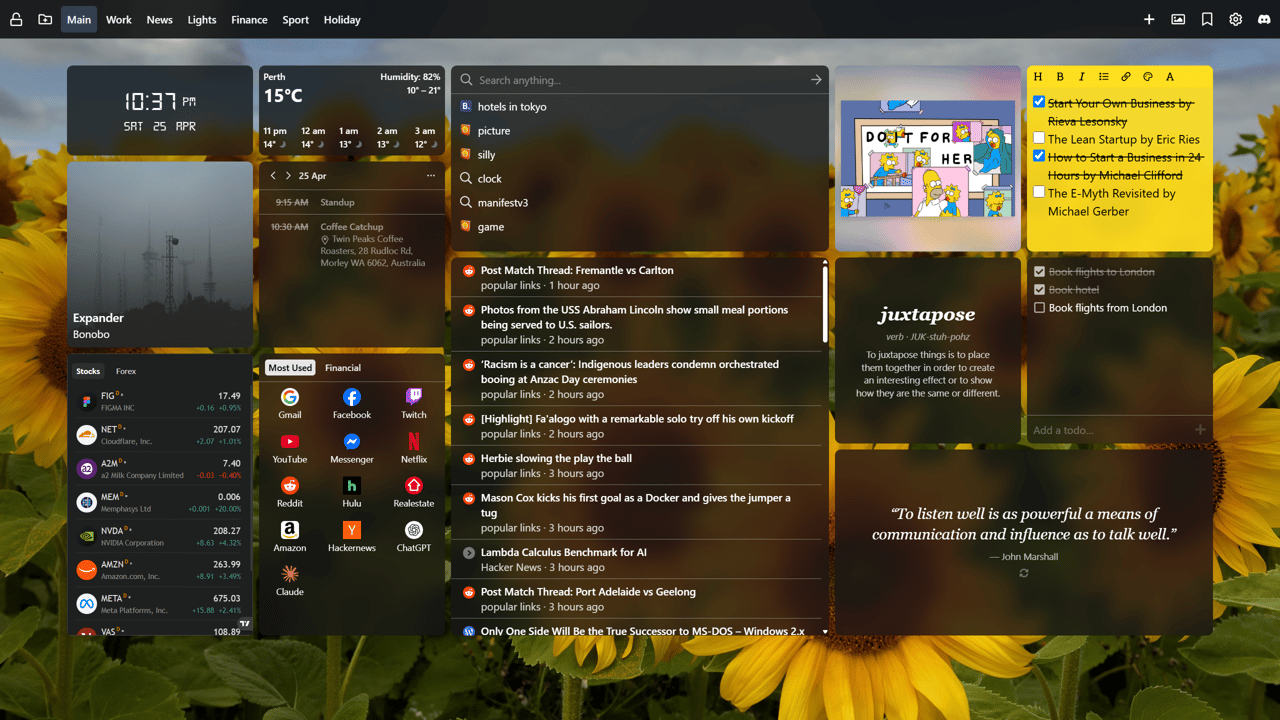
Custom Chrome new tab dashboard using New Tab Widgets extension showcasing a digital clock, weather, Google calendar events, task list in a sticky note widget, music player controls for Spotify, a project deadline countdown, TradingView finance stock market tracker, RSS news feed, calculator, Philips Hue smart home lighting controls, CPU and memory monitors, search bar and an image of a Bichon Frise set using the custom image widget, displayed on a scenic painted landscape background.

Loved by people who live in their browser.

Real reviews from the Chrome Web Store.

This is what I've been looking for, for years!

KC
Kenneth Conomos Pro memberChrome Web Store review

Beautiful and modern design with a simple and intuitive user interface.

K
Kirk Pro memberChrome Web Store review

Perfect for how I use Chrome every day.

DJ
Dennis JohanssonChrome Web Store review

The tab you open most should work the hardest.

Turn your most-opened screen into your productivity hub.

Your work dashboard, the moment you open a tab.

Track tasks, stay on top of emails, check your next meeting, and jump straight to your tools – all from your new tab. Whether your team spans time zones or your workflow spans a dozen apps, New Tab Widgets keeps it in one place.
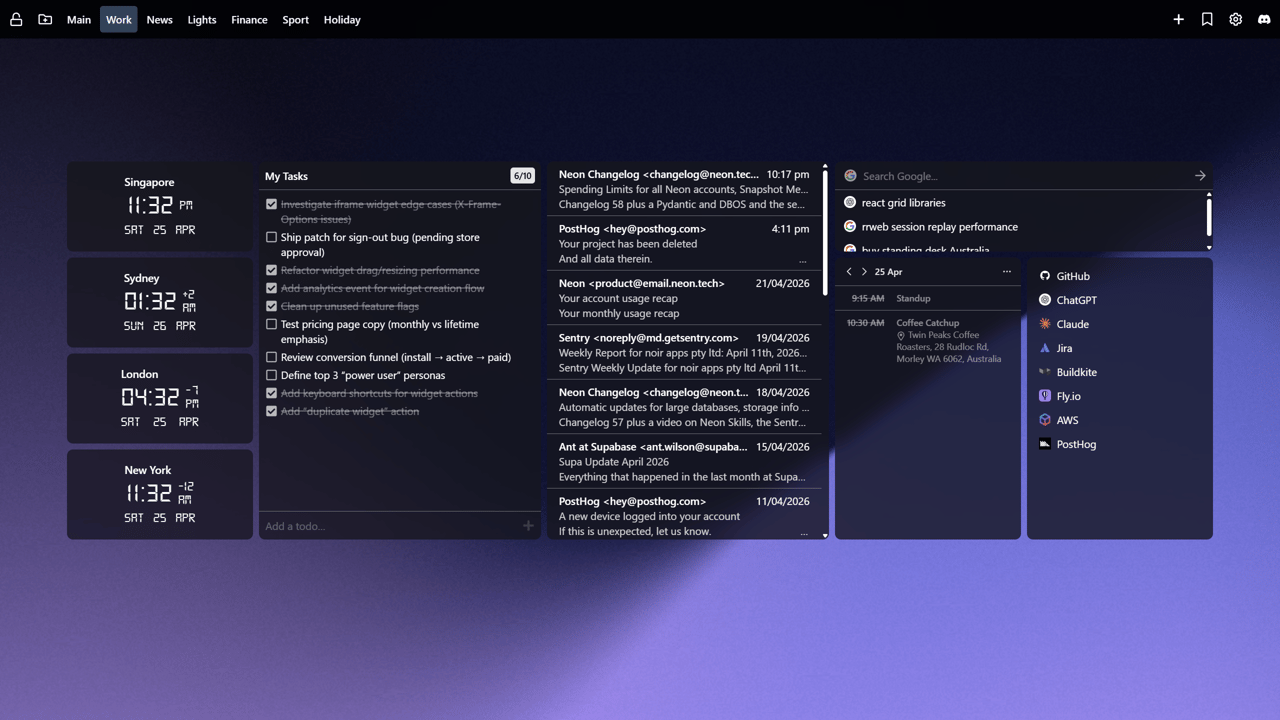
A new tab page dashboard featuring multiple widgets on a dark purple background. From left to right: a world clocks widget showing times for Singapore (11:32 PM, Sat 25 Apr), Sydney (01:32 AM, Sun 26 Apr), London (04:32 PM, Sat 25 Apr), and New York (11:32 AM, Sat 25 Apr); a task list widget titled "My Tasks" showing 6 of 10 tasks with several checked off including items about iframe widgets, drag/resize performance, and analytics; an email inbox widget displaying messages from Neon Changelog, PostHog, Sentry, and Supabase; a calendar widget showing April 25 with events including a 9:15 AM Standup and 10:30 AM Coffee Catchup; and a quick-links widget with a Google search bar and links to GitHub, ChatGPT, Claude, Jira, Buildkite, Fly.io, AWS, and PostHog. A tab bar at the top shows pages labeled Main, Work (active), News, Lights, Finance, Sport, and Holiday.

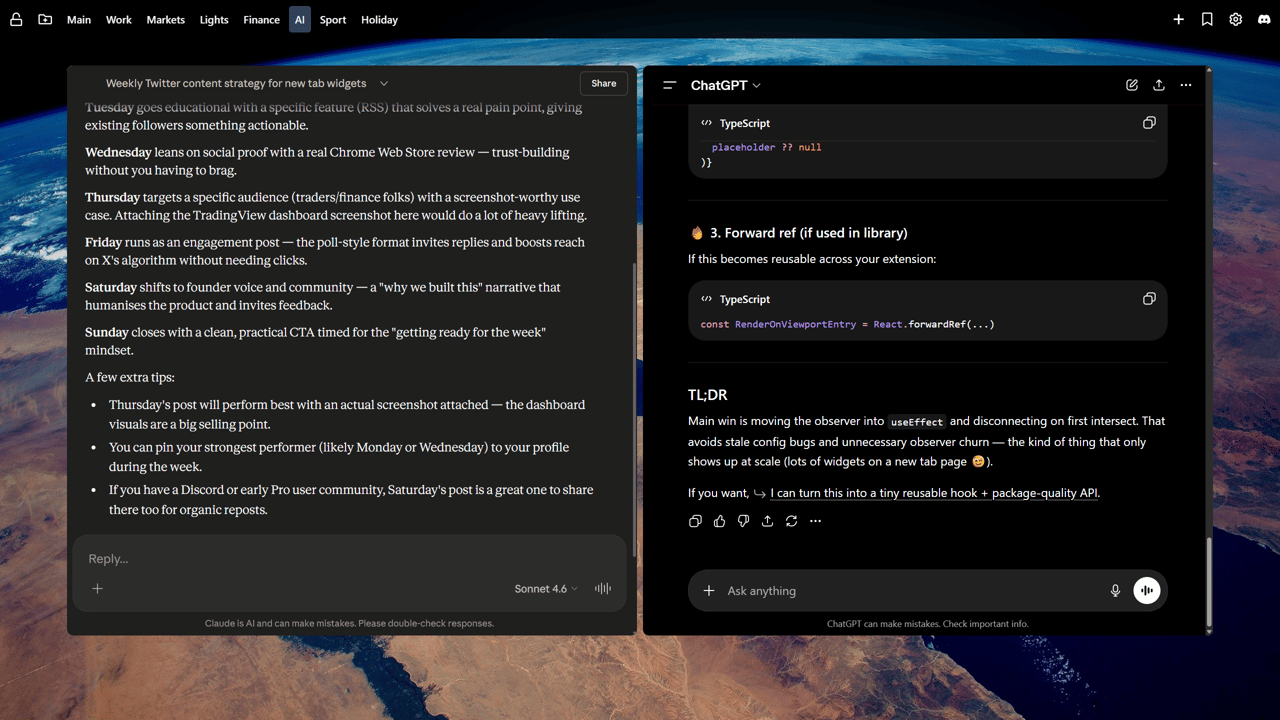
Your AI assistants, one tab away.

Keep Claude, ChatGPT, and your favourite AI tools a single click away. Build a dedicated AI tab so you can switch between assistants, pick up past conversations, and stay in flow – without breaking your rhythm.

A new tab page dashboard on the AI tab showing two AI assistant panels side by side on a scenic aerial landscape background. On the left, a Claude conversation titled 'Weekly Twitter content strategy for new tab widgets' displaying a day-by-day content plan with Monday through Sunday posts covering product launches, educational features, social proof, and engagement strategies. On the right, a ChatGPT conversation showing TypeScript code snippets for a RenderOnViewportEntry component using useEffect and React.forwardRef, with a TL;DR summary about moving an intersection observer into useEffect. A tab bar at the top shows pages labelled Main, Work, Markets, Lights, Finance, AI (active), Sport, and Holiday.

Stay ahead of the market, right from your new tab.

Monitor stock prices, track breaking news, and follow prediction markets – all without switching tabs. New Tab Widgets brings your financial dashboard to the moment you open a new tab.

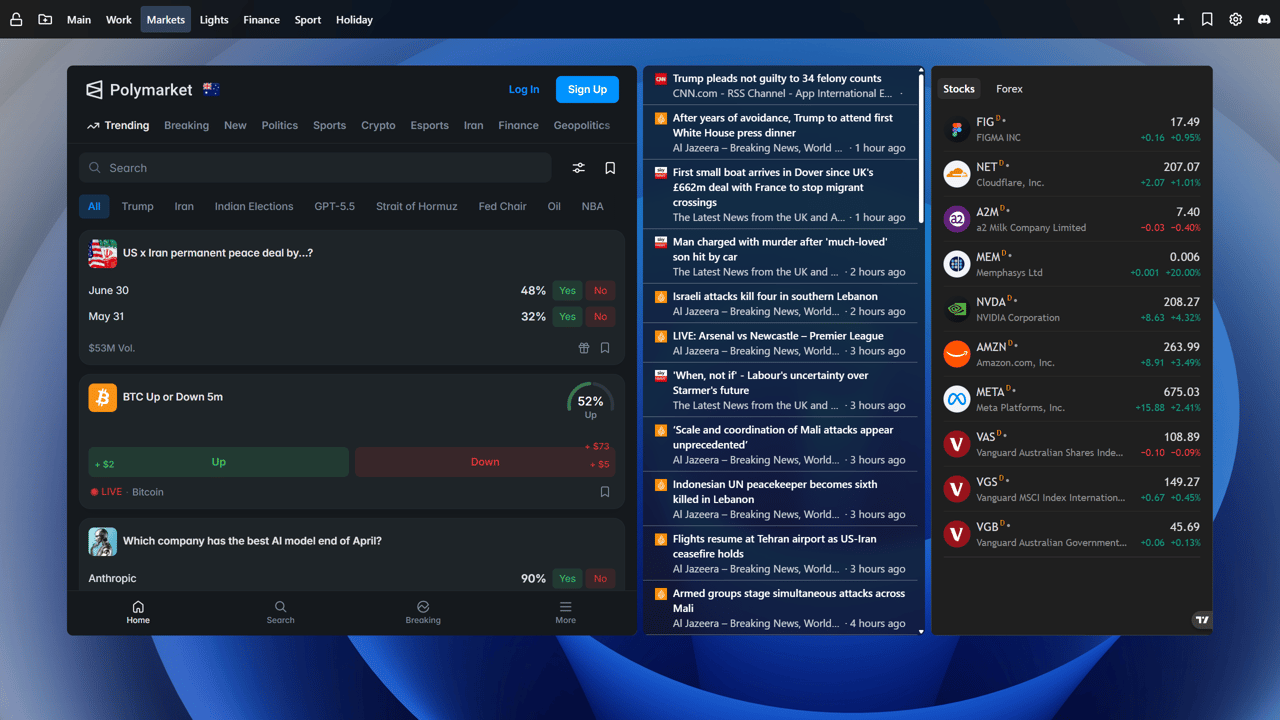
A new tab page dashboard on the Markets tab featuring three panels on a dark blue background. On the left, a Polymarket prediction markets widget showing trending categories including Trump, Iran, Indian Elections, GPT-5.5, Crypto, and Geopolitics, with active markets such as "US x Iran permanent peace deal by...?" showing 48% Yes odds and $53M volume, and "Which company has the best AI model end of April?" showing Anthropic at 90%. In the centre, an RSS news feed widget showing headlines from CNN and Al Jazeera including "Trump pleads not guilty to 34 felony counts", "Israeli attacks kill four in southern Lebanon", and "Flights resume at Tehran airport as US-Iran ceasefire holds". On the right, a stocks widget with Stocks and Forex tabs displaying live prices for FIG (Figma), NET (Cloudflare), A2M, MEM (Memphasys), NVDA (NVIDIA), AMZN (Amazon), META (Meta Platforms), VAS, VGS, and VGB, with percentage changes shown in green and red. A tab bar at the top shows pages labelled Main, Work, Markets (active), Lights, Finance, Sport, and Holiday.

Everything you care about. One tab, zero switching.

From the morning weather and daily tasks to sports scores, AI assistants, and the latest news – your Main tab keeps it all within reach. Mix and match from 60+ widgets to build a dashboard that fits your life, not a template.

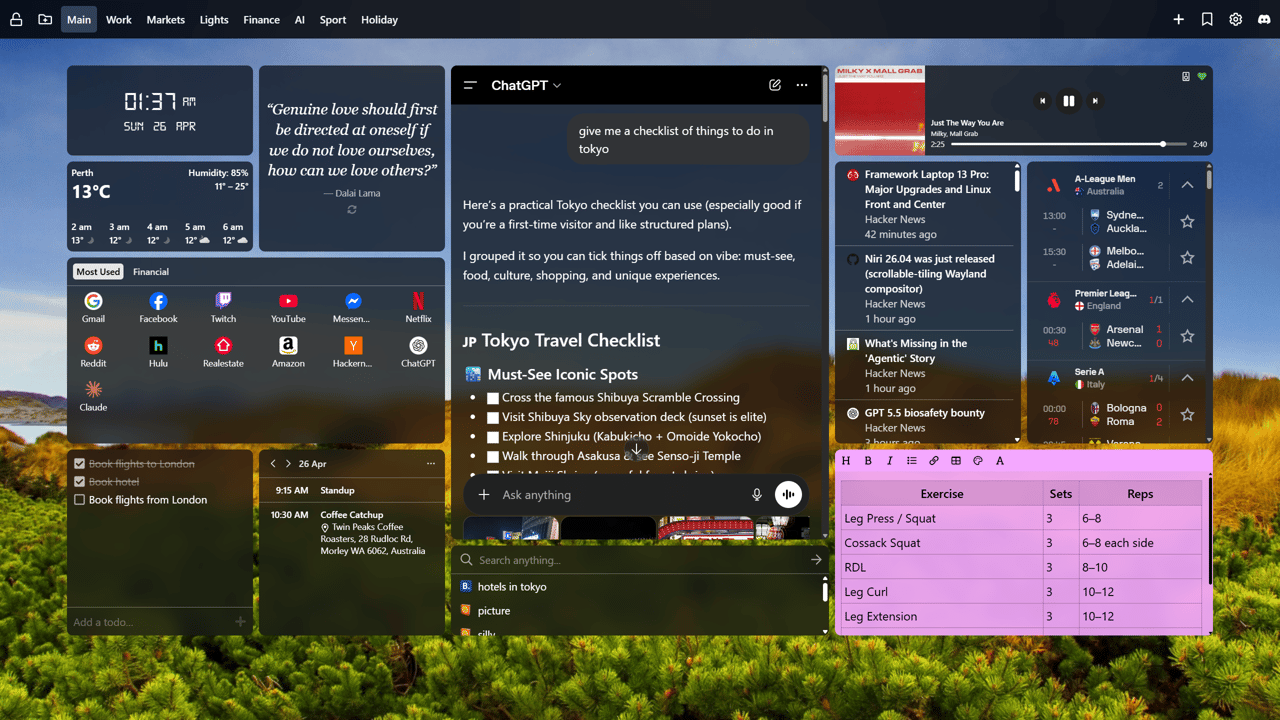
A new tab page dashboard on the Main tab showing a richly personalised layout on a scenic landscape background. Top left, a digital clock widget reads 01:27 AM, SUN 26 APR, below which is a quote widget displaying a Dalai Lama quote. A weather widget shows Perth at 13°C with humidity 85% and an overnight hourly forecast. Centre-left, a quick links widget with Most Used and Financial tabs shows icons for Google, Facebook, Twitch, YouTube, Messenger, Netflix, Reddit, Hulu, Realestate, Amazon, Hacker News, ChatGPT, and Claude. A ChatGPT conversation widget displays a Tokyo Travel Checklist with must-see spots. To the right, a Hacker News RSS feed shows recent headlines. A music player widget shows 4EVA by LUV HRTS. A todo widget lists tasks including Book flights to London and Book hotel checked off. A calendar widget shows April 26 events including a 9:15 AM Standup and 10:30 AM Coffee Catchup. A sports scores widget displays live A-League, Premier League, and Serie A match results. Bottom right, a rich text note widget contains a workout table with exercises including Leg Press, Cossack Squat, and RDL with sets and reps.

No sign-up or credit card required.

Get started for free with up to 10 widgets and 1 pages.

Bring your files, inbox, bookmarks, and more to every new tab.

Unlock Google Drive, Gmail, Calendar, RSS, Spotify, cloud sync, and unlimited dashboards.
Cancel anytime. 30-day money-back guarantee.

Starter

FreeNo email or credit card required.
  • Add up to 10 widgets
  • Create up to 1 pages
  • Basic widgets
  • Basic page layouts
Add to Chrome

Pro

$3.75 usdper month ($44.99 usd billed annually).
  • Save 25% – only $44.99 (normally $59.88)
  • Unlimited widgets
  • Unlimited pages
  • Unlock premium widgets and features including:

    • Google Calendar - keep upcoming events and meetings in view, and create new ones without leaving your new tab.

    • Gmail - read, search, and stay on top of multiple inboxes directly from your new tab.

    • Google Drive - search files, open recent uploads, upload by drag and drop, and manage files without leaving your dashboard.

    • Stock & Finance - follow markets, prices, and key financial data at a glance.

    • iFrame - embed exactly what you need, hide distractions, and fine-tune the view with custom CSS.

    • RSS Feeds - keep up with your favorite sites, blogs, and newsletters in one place.

    • Spotify - control playback and see what's playing without breaking focus.

    • Images - showcase photos, artwork, and visual inspiration to make every new tab feel more personal.

  • Arrange widgets in a grid or place them freely anywhere
  • Cloud backup and syncing across devices
  • Per page custom wallpapers
  • Full design control with custom CSS
  • Used by people who open 50+ tabs a day

LifetimeOnly 6 remaining

$179.99Get Pro plus all future updates for a one time purchase.
  • Everything in Pro
  • Includes all future widgets and updates
  • Pay once, enjoy forever
  • Only available for first 20 customers
  • Join 14 other users who have already upgraded

Secure checkout powered by Stripe, Inc. Cancel anytime. No lock in contracts. No hidden fees. 30-day money-back guarantee.

Frequently Asked Questions

What is New Tab Widgets?
New Tab Widgets is a browser extension that transforms your new tab page into a customizable dashboard with a variety of widgets to enhance your productivity and browsing experience.
Is New Tab Widgets free?
Yes! New Tab Widgets is completely free to use with optional Pro features available via subscription or a one-time purchase (limited available).
Do I need to create an account?
No account is required to use New Tab Widgets. Simply install the extension and start customizing your new tab page.
What widgets are available?
New Tab Widgets offers a variety of widgets including weather, to-do lists, bookmarks, notes, and more. We currently have 69 available to choose from. Some premium widgets are available with a Pro subscription. You can view the full list of available widgets on our Widgets page.
How do I install New Tab Widgets?
Is my data secure?
We take your privacy seriously. New Tab Widgets only collects the data necessary to provide the widgets you use. We do not sell or share your data with third parties. For more details, please refer to our Privacy Policy.
How can I contact support?
If you have any questions or need assistance, you can contact us via email at , or you can also find us hanging out in our Discord server. We're here to help!